Updated May 2026
As some of you may know, I carry everything I own in my backpack every day. Recently, that backpack was stolen. Replacing my passport took some time, but replacing my laptop did not, and within minutes I had a new Macbook up and running with the exact same files and browser tabs that were open on my previous one at the moment it was stolen.
This was the result of serious effort I put in nearly ten years ago to consolidate, organize, and back-up my digital life, and the contingency plans I put in place if anything was stolen. It took a long time before that effort was put to the test, but it looks like that time was absolutely well spent!
A lot of people were curious about how I made this happen. So in this post I will detail what my digital ecosystem looks like and the contingency plans for if my devices are stolen. Though I imagine very few people carry all of their worldly possessions in their backpack as I do, home break-ins, fires and regular theft are still a thing, so I hope this post can be useful.
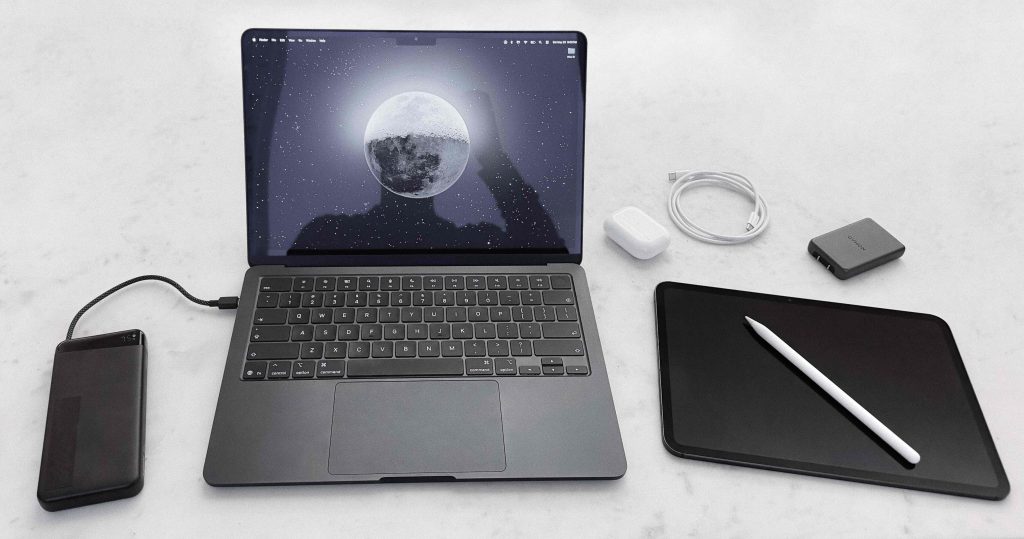
My personal hardware setup (2026)
The Philosophy
I treat my technology and data the same way I do my physical possessions: intentionally and with extreme prejudice. Every device and app has to earn its place. This is one of those things that seems painfully obvious yet very few people do. I’d like to call this ‘digital minimalism.’
I feel like the term digital minimalism has been distorted by people who take their technology cynicism too far and isolate themselves from reality. Abstinence isn’t the same as discipline; you’ll miss out on tools that can improve your life. So I’d like to propose a better definition:
Use technology, but selectively and with restraint. Use social media to stay in touch with friends, but never scroll an algorithmic feed. Own a laptop, which can enable creative output, but never a TV, which cannot enable anything. Reap the benefits of technology, like learning new skills, staying connected, or creating something meaningful, while avoiding the tradeoffs.
Tenets
- Only own what you need
- Always use the best tool for the job
- Don’t allow anything to hold you back
The first two points are subjective; everyone’s technology needs are different so it’s pointless to discuss the best laptop or app. The third point is interesting, however, and is the focus of this post.
Not allowing my devices to hold me back means I can’t worry about losing them, which means I need all of my data backed up to the cloud. But at the same time, I want all my data on my devices, so I’m not dependent on wifi or a cell signal to access my files or photos while traveling.
This means keeping my digital life extremely organized, trimmed to small file sizes that can back up or download in seconds, and secure with several layers of redundancy using large, stable platforms that I trust to still be around in decades.
The Architecture
This framework is designed around security and recoverability. By using established platforms like Apple and Google, I can minimize complexity and cognitive overhead and have a framework that is both encrypted and easy to access at any time from any device.
But this introduces a challenge. For most people it’s extremely difficult to lock yourself out of your digital life, since these platforms have login processes that make it easy to authenticate yourself using a secondary device. But if you lose every device simultaneously, it gets complicated. Tech companies would rather you lose access to your account than be blamed for giving a stranger access, and these days memorizing a password is not enough. Plus, circular dependences!
That’s why in addition to making contingency plans for losing individual devices, I made sure to plan for the worst case scenario: losing everything at once. All while keeping my accounts safe with multi-factor authentication and without relying on physical authentication methods.
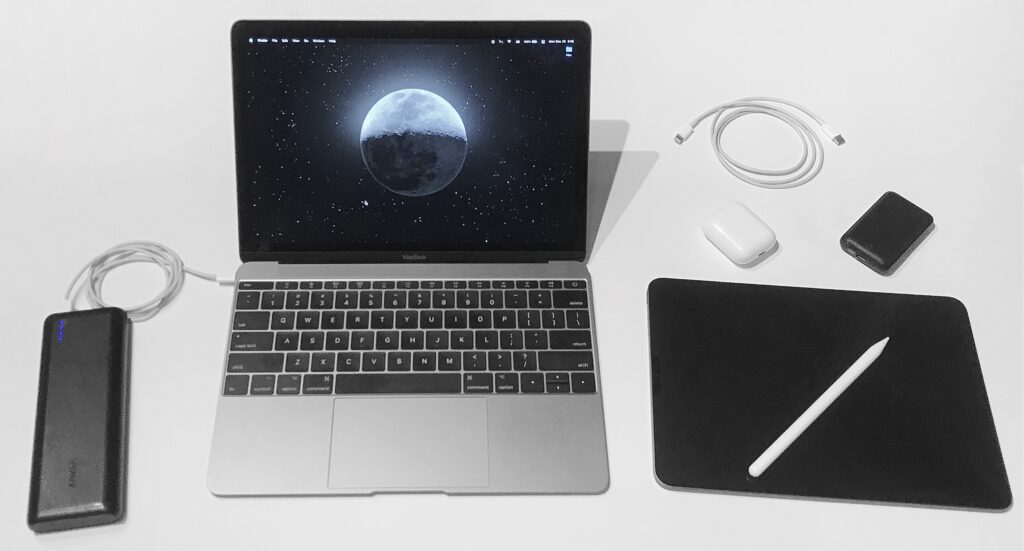
My personal hardware setup (2019)
The holy trinity of my digital life is my Apple, Google, and 1Password accounts. Consequently, these are the only three passwords I have memorized. These passwords don’t give account access, since everything has multi-factor authentication enabled, but having them memorized makes logging in quicker. All three are passphrases, four concatenated english words with an optional number thrown in, which are incredibly secure and impossible to forget.
1. Apple
On my Macbook, all of my data is located in one folder. This folder is on my desktop, titled ‘Files’, and contains everything I’ve ever done, including current projects, tax archives, and school essays from a decade ago. Since my desktop is synced to iCloud, this means everything syncs to iCloud.
This is not an intended use of iCloud drive, and it’s possible I’m the only person who does this, but it works brilliantly. Not only does it ensure every file is permanently backed up, but it also means everything is accessible in the Files app on my other devices. Moving files back and forth this way is often even faster than AirDrop.
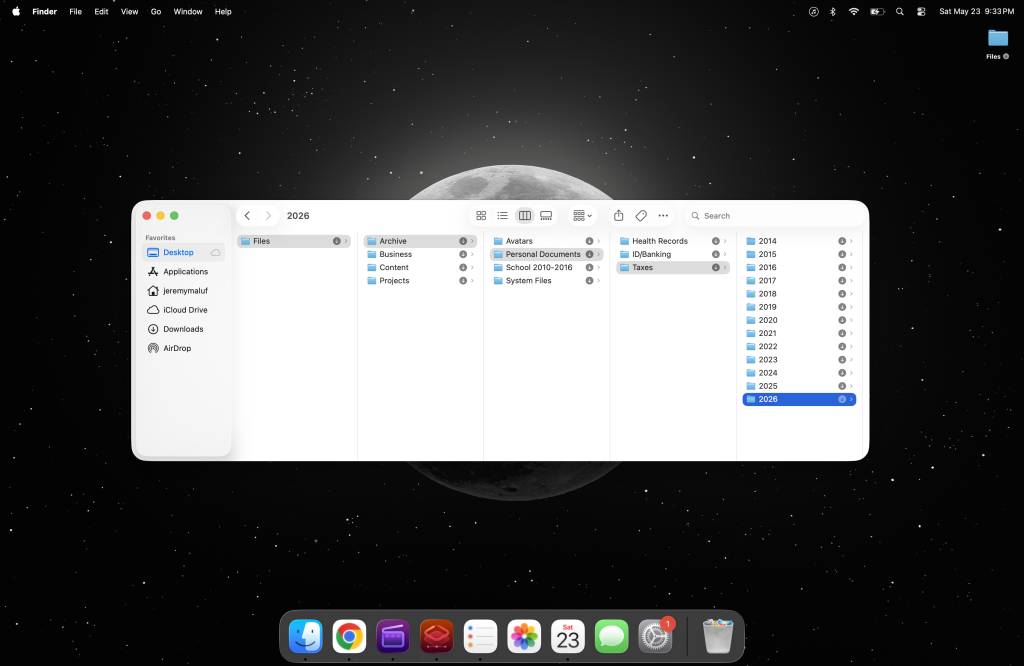
The clean desktop is performative; usually it’s full of current projects
This is only possible because I keep my data structured and minimal. My entire iCloud drive, with over two decades of data, is only 30GB, and my entire photo library is only 100GB. This makes handling my data much quicker and easier than if I were dealing with terabytes.
To illustrate how spartan this data regimen is, if I record a two-hour video with my phone right now, that’s 100GB. So to take photos and 4K HDR videos every day and only have 100GB since my first iPhone in 2008* is something I am proud of. I do this by always trimming videos to the necessary portion and deleting duplicates or unnecessary shots within minutes. This habit has the side effect of making my camera roll organized and easy to parse and share.
Since iCloud is a secure, encrypted filesystem, I can store private data like digital IDs, bloodwork, and copies of my secret keys and backup codes. In my Macbook settings, FileVault, Stolen Device Protection, Find My, and Recovery Contacts are all enabled. I do not use Advanced Data Protection, as I believe it to be overkill, but I am open to changing my mind. My threat model is theft and targeted hacking, not government subpoenas.
*I broke this phone in 2011, which resulted in me losing all my photos up to that point and laid the groundwork for the effort I put in a few years later to make sure it never happens again.
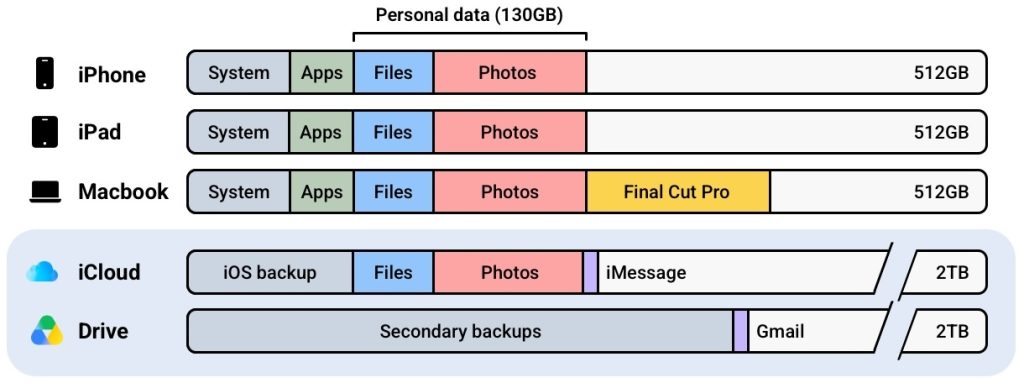
2. Google
I use four Google products. I may replace Google Drive if I ever find an alternative that I trust to still be around in a decade, but with the current state of cloud storage companies this looks to be unlikely. Regardless, the other three products are perfect and I don’t foresee them changing.
- Drive: I use Drive to back up my large files because Apple intentionally designed iCloud to function poorly for this use case. This is mostly Final Cut Pro projects, as well as the occasional manual backup of iCloud and secondary backups of important data.
- Gmail: My email platform. There aren’t many alternatives if you want an email platform you never need to manage and can still access your accounts 20 years later.
- Chrome: My desktop browser. It syncs my bookmarks, tabs, and extensions to the cloud so no setup is required on a new device. The extensions I use: 1Password, Privacy, Adblock, Picture-in-Picture, Wayback Machine, Google Translate. For YouTube I also use: SponsorBlock, Return YouTube Dislike, YouTube Adblock, VidIQ. 1Password and Privacy are the core two, the rest are just for quality of life.
- Authenticator: My primary 2FA method for a dozen of my core internet accounts. If you use this, make sure that “Google account syncing” is enabled, otherwise you’ll be unable to restore access if you lose your phone.
3. 1Password
1Password gives me access to my remaining 600 accounts, from social media to banking. All of these accounts have alternate entry points so losing 1Password is not critical, but I still try to make sure it never happens. Since the 1Password secret key is not enough to gain account access, even combined with an email, I was able to store it liberally in half a dozen places.
Bonus: Thumb drive
For the past few years I’ve also had a thumb drive, kept in my pocket at all times, that functions as a tertiary backup for large files that don’t need to be encrypted, and allows for quicker file access when needed. It has proven to be much more reliable than the SSD drives I’ve used over the past decade, but I sometimes doubt the usefulness of a physical drive so I may eventually get rid of it.
What This Costs
The total cost of all my technology is about $2,500, or $3,500 when I carry an iPad. $1000 each for a Macbook, iPhone and iPad, and $500 for everything else. This is the worst case; I’ll pay much less during a planned upgrade since I can buy during a sale or trade-in my old device.
My monthly subscriptions are very reasonable for the amount of data and redundancy this framework provides. Relevant services I pay for:
- $9.99/mo for 2TB iCloud
- $9.99/mo for 2TB Google storage
- $4.99/mo for 1Password
- $19.99/mo for AppleCare One
- $60/mo for Verizon + T-Mobile eSIMs (got a good deal)
Ignoring cell service, which is a universal expense, these subscriptions total just $45 per month and get me 4TB of secure, redundant cloud storage, a password manager, and insurance coverage for all of my devices: damage coverage for my Macbook and damage/theft/loss coverage for my iPad and iPhone. My Apple Watch and Airpods are also insured, but upfront at purchase in order to arbitrage the pricing differences.
Assuming my stuff gets stolen once every ten years, which anecdotally seems to be the case, the amortized cost of replacing everything comes down to just a few bucks per month. Not bad!
The Recovery Models
Once I’m certain my devices are gone and there’s no chance of recovering them, the first step is to remotely lock and erase them in Find My. All Apple devices are encrypted by default so there’s no risk of a data breach, but this step fully bricks them and can display a message if they’re found. After that, my next step depends on what was taken. Here’s the runbook.
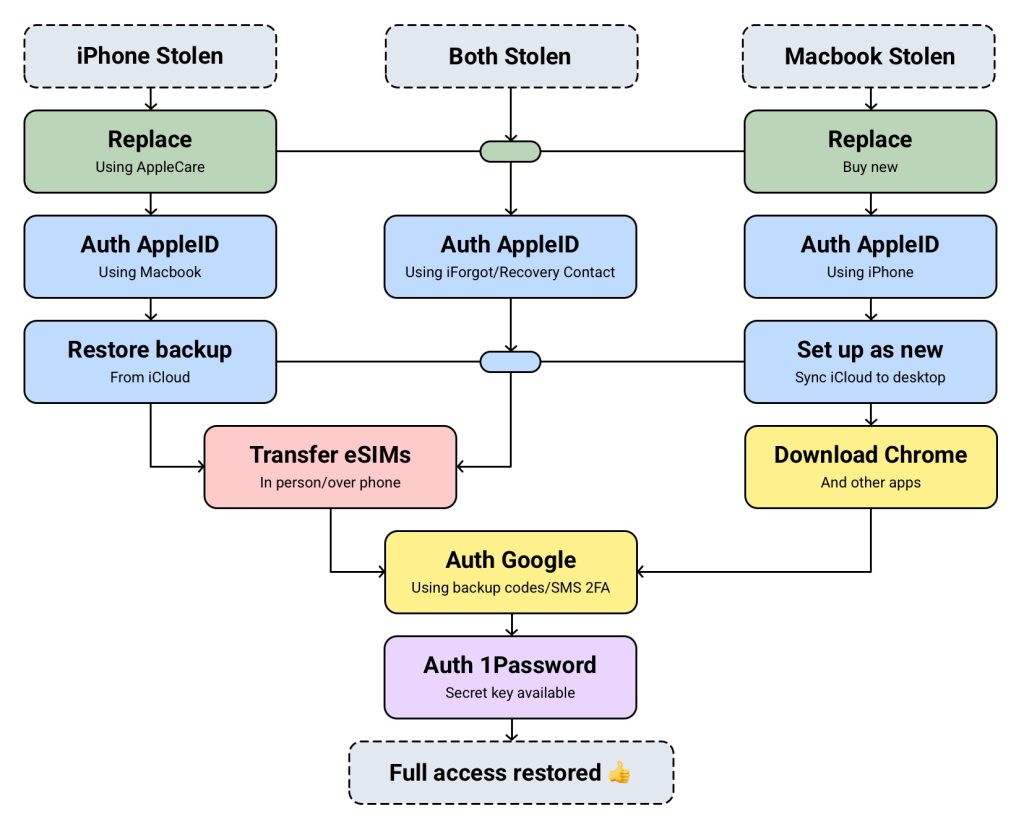
I occasionally carry an iPad or backup iPhone, which adds another layer of security by slightly increasing the odds that I retain a trusted device after a theft. But only slightly; if my Macbook is stolen my iPad will probably be as well (as demonstrated by a 2022 theft attempt in Texas, in which I chased the thief down for 30 minutes to get both devices back). The recovery process for these devices is the same as my Macbook.
Finally, I should mention that I have two weak points with my setup: on my Macbook I’ll lose any Final Cut Pro projects actively being edited (Apple coded Final Cut Pro to be incompatible with iCloud-synced folders), and on my iPad I’ll lose any Procreate artwork that I didn’t manually backup. I believe these are solvable issues, so if you have ideas please reach out!
How it Played Out
After the thief managed to find my Airtags and deactivate the Macbook’s tracking signal, I marked it as ‘lost’ in Find My. I then bought a new Macbook and sat down to set it up.
First, I logged into my iCloud account. The moment I did this, all of my iCloud files automatically synced to my desktop folder. I then downloaded Chrome and logged into my Google account, and a second later all of my bookmarks and extensions synced as well. From there, it was just one click to restore all the tabs that had been open on my previous laptop. All within 5 minutes.
I downloaded Final Cut Pro and Pixelmator Pro, my two daily apps, and logged into 1Password to unlock everything. Any other apps I had on my previous laptop, from Claude Code to Kerbal Space Program, were secondary and rarely used, and I’ll download them if I need them.
Finally, I tweaked a few settings to make the MacOS ecosystem usable, like reducing the display size, turning off the AI features, and installing NoTunes to fix some of Apple’s UX flaws. I made sure my iCloud desktop and local desktop were synced again, and in settings I swapped the laptop within my AppleCare plan. And that was it! It was like my laptop had never been stolen.
Total time, maybe 15 minutes.
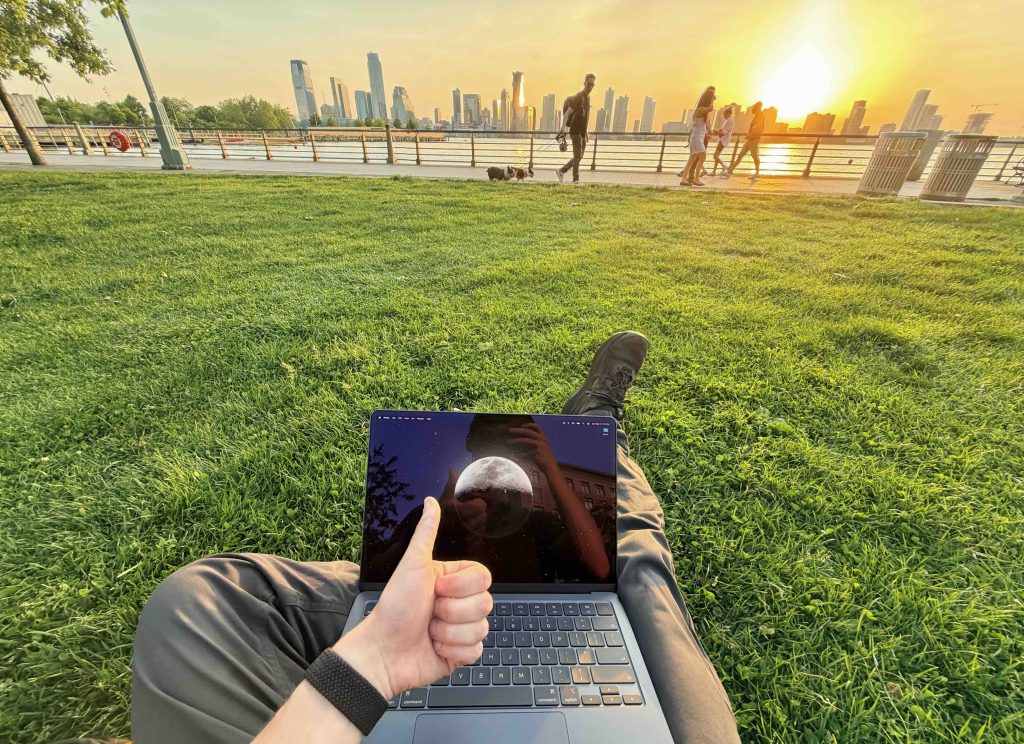
Like it was never stolen
For anyone wondering how my bag was stolen, it involved many drinks and was entirely my fault. This is the reason I have contingencies for theft recovery instead of only optimizing for theft prevention: my credo is to live an interesting life, and an interesting life cannot be safe and controlled all of the time. I wouldn’t change anything about that evening. I’d do it all over again.
These contingency plans allow me to truly feel free and not have to worry about my possessions when I’m out on an adventure, whether it be in a bar in the Upper East Side or a favela in Rio. My only concern should be for the material value, and if the adventure outweighs it, then I take the risk.
If this mindset appeals to you, I highly recommend taking a similar approach to your technology to decrease cognitive load and stop letting your stuff hold you back.
Website Infrastructure
As an addendum, I often get asked about this website, so I figured I’ll include that info here. It’s nothing fancy. The website is built on WordPress using a custom theme I stripped down, the domain is bought and hosted on Namecheap, and analytics is on Plausible. The goal is for this to be as simple and self-sufficient as possible; I can ignore it for half a decade and it will stay up.
Namecheap is known to struggle with traffic spikes, but I’ve hosted this website with them since 2017 and never had a problem, even with 1,000+ concurrents. That said, considering they were sold to private equity in 2025, if this ever becomes an issue I am prepared to move quickly!
To keep the site secure, Namecheap has TOTP 2FA enabled, WordPress has very few plugins installed, and I always assume any email about my domains is a phishing attempt.
Expenses:
- $18.48/yr for website domain on Namecheap
- $68.88/yr for website hosting on Namecheap EasyWP
- $190/yr for Plausible Analytics (100,000 page views per month plan)
In total I pay $23.11/mo for this website, which is mostly for analytics. If I ever switch back to Google Analytics (free) my website expenses would be $7.28/mo! Either way it’s very affordable, and I do think people appreciate this site not having tracking cookies.
In addition to the above website expenses I also pay $49/yr for Carrd Pro Plus. I also perpetually have off-and-on expenses for miscellaneous other domains and projects.
Thank you for reading!
I send the occasional email to this list, including notes on projects and interests, travel adventure write-ups, and notifications for when I post updates to this site.
100% human-written | instagram | twitter | youtube | hi@jeremymaluf.com